

Nowadays, smartphones are a part of our lives. The article is about if your mobile stolen or mobile lost complaint online to find it. Everyone has a smartphone that has stored needed documents or memorable photos. Suddenly if you are missing your phone, what to do and how to complain online to find the missing smartphone are big challenges for you. If you complain online on the government website, it is very possible that you will get your missing device.
What to do after mobile lost or stolen
We should know what to do if your phone is stolen or lost. At first you call the toll-free number 198 and give details about the missing smartphone that you want to deactivate the SIM card . If you do not deactivate the SIM card, the person who has stolen or found the phone, he can misuse your SIM card, or can nil your bank account, or can do other bad activities, and at last you will be responsible for this.
You will go to the police station and tell them about the stolen cell or missing phone, and they will give you a format for the application to fill out, and then the police station will give you a receipt copy with a stamp and seal that you keep carefully with you; it will be needed later.
Mobile Lost Complaint Online time
If your cell phone is lost or missing in India, you should file an online complaint as soon as possible. There is no fixed legal time limit, but reporting it any police station or online portal immediately, it helps prevent misuse and improves the chances of recovery.
The following steps must be following:
- Block your SIM card immediately
- Contact your mobile network provider
- File missing report on the official portal
- Visit nearest police station and file missing report
- Inform your bank if payment apps ware installed
How to SIM block
You can block a SIM card in different ways, like calling 198, or calling the customer care number, or going to the SIM card office, and it is necessary to close the SIM card. After being blocked, you will take a new reissued SIM card with your same number from the SIM card office that you used.
Mobile Lost Complaint Online | How to Find Stolen Phone |
If anyone mobile lost complaint online must to find your lost mobile.
Open your Google Chrome browser and search www.ceir.gov.in (Central Equipment Identity Register) portal; an interface will open in front of you.
Follow this & fill out the online form. You can also search: Sancharsathi.gov.in. It also comes back to the same website page.
Sanchar Saathi Mobile App
Mobile lost complaint online first in the official website. Open the apps and then:
Below, 4 options will be shown.
Such as 1. Block Stolen/Lost Mobile 2. Unblock Found Mobile 3. Check Request Status 4. Forget Request ID
1. You will click on: Block stolen/lost mobile.
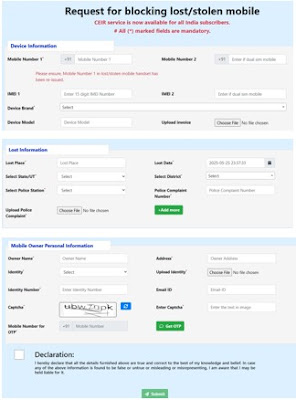
A form will be open to fill out.
Request for Blocking Lost/Stolen mobile.
Device Information (written as a table)
| Mobile No. 1 | Enter the mobile number that has been reissued. |
| Mobile no. 2 | Enter the other phone number if dual SIM. |
| IMEI 1 | Enter the 15-digit IMEI number from the bill or smartphone box. |
| IMEI 2 | Enter IMEI 2 from the bill or smartphone box. |
| Device Brand | Select from the drop-down box (e.g., Nokia/Vivo, etc.). |
| Device Model | Write the model no. |
| Upload Invoice | Choose file & upload invoice. |
Lost Information
| Lost place | Write the name of the place where the device is missing. |
| Lost Date | Write the lost date and time. |
| Select state | Select from the drop-down list. |
| Select district | Select from the drop-down list. |
| Select Police Station | Select the police station name where the complaint was filed. |
| Police Complaint Number | Write the complaint number. |
| Upload Police Complaint | Choose a file and upload it. |
Phone owner personal details
| Phone owner name | Fill in the owner name. |
| Address | Write the full address. |
| Identity | Select Aadhar card |
| Upload Identity | Choose a file and upload the Aadhar card. |
| Identity number | Write the Aadhar card number. |
| Email ID | Must write email in small letters |
Enter Captcha
Enter phone number for OTP.
Get OTP- (tick mark) on the declaration box, and finally submit the application.
After submitting, an enrollment number is found via SMS or email, and you can check the request status on the website.
How to trace lost mobile
You will find an option to trace lost mobile on the website: www.sancharsathi.gov.in, log in with the Enrollment number, and you can contact the police station.
Conclusion
If your mobile lost complaint online first or stolen or missing, you must file a complaint online to find the missing or stolen phone and also details about what to do if your phone is missing or stolen and how to trace stolen mobile and find it. If you complain online, you will easily get the missing device.